CrewAI Tutorial By Example: Automate YouTube Channel With AI Agents (Part 2/4)
By Kronecker AI Research ·
In the previous article, we looked into the AI system we want to build, briefly explained what is CrewAI, and talked about the project structure & setup.
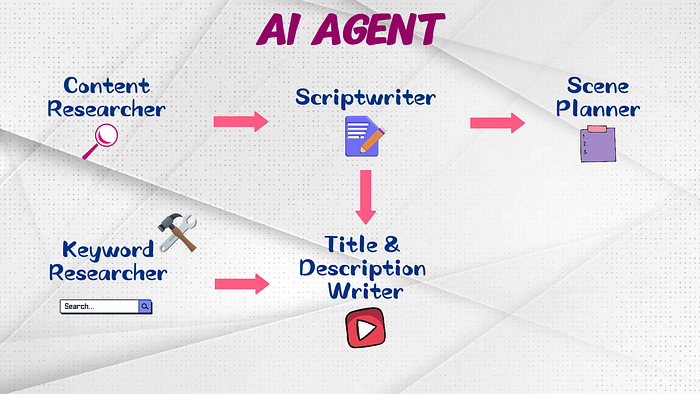
This article will deep dive into the CrewAI code to build the desired AI system. Check out the GitHub repo for the code of this tutorial series.
Article Outline
- Agents & Tasks in CrewAI
- Element #1: Content Research
- Element #2: Scriptwriting
- Element #3: Scene Planning
Agents & Tasks in CrewAI
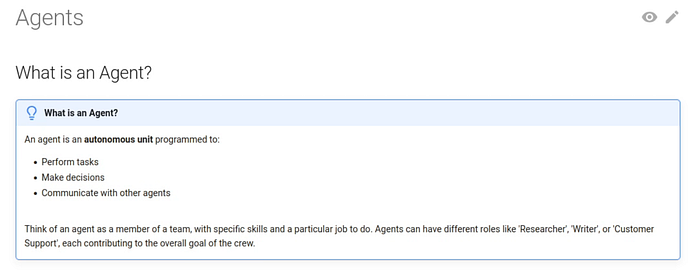
Before we create the desired AI system, let’s explore briefly the concepts of Agent()and Task() in CrewAI. According to the CrewAI documentation, agents perform tasks, make decisions, and communicate with each other. Agents can have different roles and contribute to the overall goal of the entire crew.
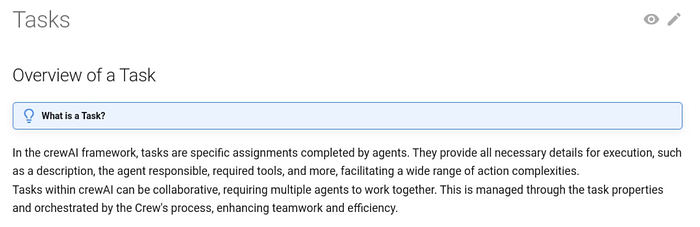
The tasks in CrewAI are specific assignments completed by agents. They provide all necessary details for agent execution. Tasks can also work collaboratively with multiple agents involved.
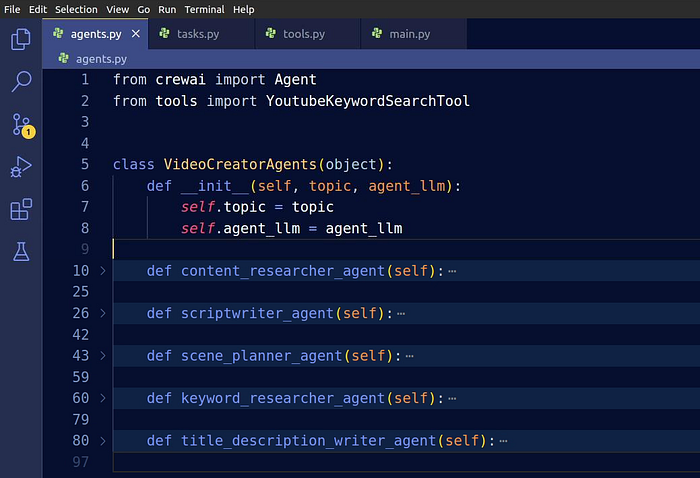
Let’s look at the agents.py file in our project. We create a class named VideoCreatorAgents. Within this class, we provide the topic in which we prefer to create a video, and agent_llm for the LLM that our agents will be using. Later in this tutorial, we’ll create all the necessary CrewAI agents in this class.
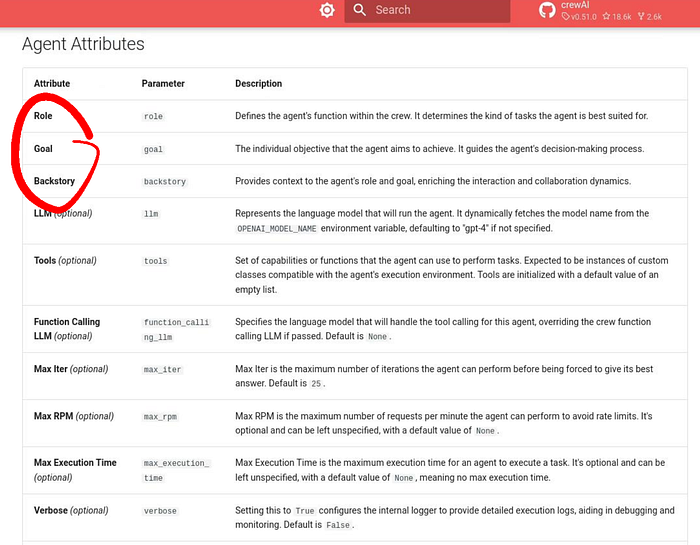
For each CrewAI Agent(), there are a few arguments we must define:
- Role that each agent will take on
- Goal they’re looking to achieve
- Backstory to provide more information around that role and goal
These three are required, and the remaining arguments are optional. We’ll look further into some of the optional arguments when we focus on specific agents later on.
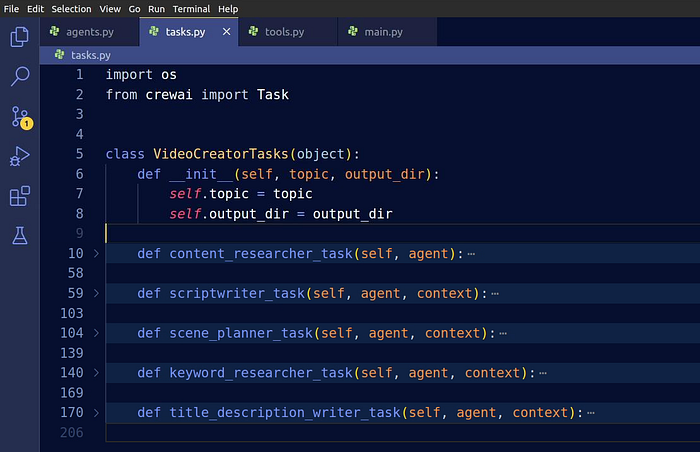
Next, move on to the tasks.py file and create the VideoCreatorTasks class. Within this class, we specify topic for the video’s topic, as well as output_dir for the output directory where all the results will be stored. Later in this tutorial, we’ll create all the necessary CrewAI tasks associated with each agent.
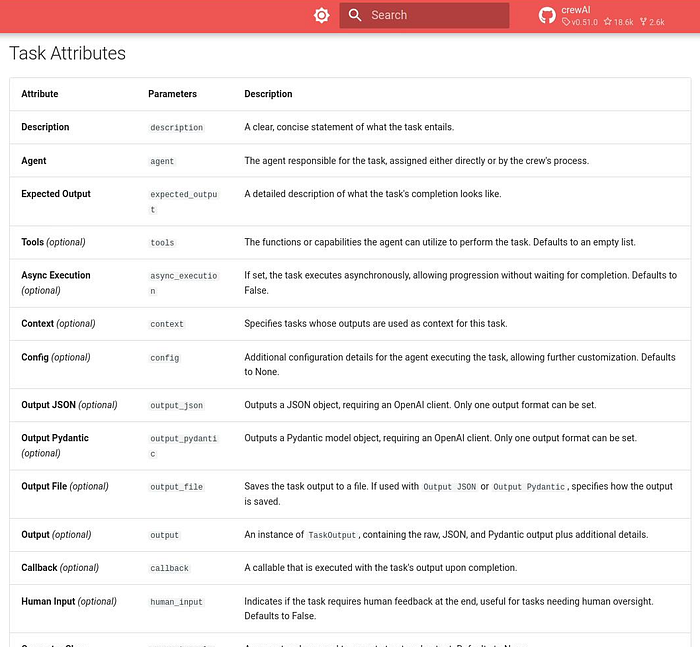
For each task, we define a few arguments:
descriptionthat explains how exactly the corresponding agent should work- Specify which
agentwill execute the task expected_outputso that the agent knows what a successful completion stage looks likecontextto provide a list of tasks whose outputs will be fed as the context of this taskoutput_fileto have the generated response saved in a file for easier viewing and debugging
You can check out the CrewAI documentation that explains all the attributes.
Now, with all of that set up, we’re ready to dive into the central elements of the AI system.
Element #1: Content Research
Let’s kick things off with the first CrewAI agent that does content research for video production. In the agents.py file, we create the content_researcher_agent() within the class VideoCreatorAgents. We specify the role and goal for the agent.
The backstory is where we setup the agent as an expert in research for video contents. Then give it a little bit more detail on collecting information that are valuable and interesting to create a YouTube video on the given topic. Ask the agent to put the collected information into key points for our content outline. We also make it clear that its output will be passed on to another agent in our crew. This helps the agent understand the sequential order of execution.
Specify the llm we’re using. In our case, it’s GPT-4o-mini, and we’ll pass it to this agent class later in the main.py file. Set verbosity to true, that will print out the execution process when we run it later on. Set allow_delegation to false, since we don’t need the agents to delegate tasks among themselves. Set max_iteration to 5, so that the agent doesn’t fall into a repeated loop when generating outputs. We will explain more on this when analysing the CrewAI run in the coming-up articles for this tutorial.
def content_researcher_agent(self):
    return Agent(
        role="Video Content Researcher",
        goal=f"Research for valuable and important content to create a YouTube video on the topic: {self.topic}.",
        backstory=(
            f"You are an expert in conducting research to create a YouTube video on the topic: {self.topic}. "
            f"You collect information for the mentioned topic that are valuable and interesting for "
            f"making a YouTube Video, and assemble the collected information into an outline with key points. "
            f"Your work will be passed on to Video Scriptwriter to write a video script on this topic."
        ),
        llm=self.agent_llm,
        verbose=True,
        allow_delegation=False,
        max_iter=5,
    )
Create Task
We create the task for our content researcher in tasks.py. This is where we give further details on how the agent should do its work.
We provide a detailed description on the important things that should be included in its output. For example, we elaborate on the key areas the content researcher should prioritize, things to consider when creating the content outline, and important sections to include. We also want the agent to incorporate SEO keywords and relevant sources for citation.
Next, we have the agent that is responsible for this task. It’ll be provided to the task later in main.py. Save the generated content outline in an output_file at the desired path.
def content_researcher_task(self, agent):
    return Task(
        description=(
            "This research content will be used by other agents to help them with their tasks. "
            "Please do the following for content research:\n"
            f"1. Prioritize the latest trends, key players, and important news on {self.topic}.\n"
            "2. Identify the target audience, considering their interests and pain points.\n"
            "3. Develop a detailed video content outline including an introduction, section key points, "
            "summary and a call to action.\n"
            "4. Include SEO keywords and cite relevant data or sources."
        ),
        expected_output=(...),
        agent=agent,
        output_file=os.path.join(self.output_dir, "video_outline.txt"),
    )
When it comes to expected_output, we ask it to output in a specific format that we prefer, explicitly state that the agent should strictly follow the template, and no extra stuff should be generated.
After all, LLMs can get quite chatty sometimes.
We give a clear template that the agent should follow within the triple backticks when generating its response for the content outline. Give it some exact line examples on how the output should look like.
def content_researcher_task(self, agent):
    return Task(
        description=(...),
        expected_output=(
            "A comprehensive video content plan document with an outline, audience analysis, "
            "SEO keywords, and resources. Your output file should follow the template provided below inside "
            "the triple backticks delimiter. You should STRICTLY follow the template format INSIDE "
            "the triple backticks delimiter. Do not include any extra words or symbols other than those "
            "required to fill up the template format.\n"
            "```\n"
            f"Video content outline for topic: {self.topic}\n\n"
            "# Section 1: [put section name here]\n"
            "- [key point #1 for section 1]\n"
            "- [key point #2 for section 1]\n"
            "- [key point #3 for section 1]\n"
            "- ...\n\n"
            "# Section 2: [put section name here]\n"
            "- [key point #1 for section 2]\n"
            "- [key point #2 for section 2]\n"
            "- [key point #3 for section 2]\n"
            "- ...\n\n"
            "# Section 3: [put section name here]\n"
            "- [key point #1 for section 3]\n"
            "- [key point #2 for section 3]\n"
            "- [key point #3 for section 3]\n"
            "- ...\n\n"
            "# Section ...\n\n"
            "# SEO keywords:\n"
            "- [SEO keyword 1]\n"
            "- [SEO keyword 2]\n"
            "- ...\n\n"
            "# Relevant data sources:\n"
            "- [Source 1]\n"
            "- [Source 2]\n"
            "- ...\n"
            "```"
        ),
        ...
    )
Element #2: Scriptwriting
We are done with the content researcher part. Now let’s get to the second element, which is scriptwriting.
In agents.py, create the scriptwriter_agent(). Set the role as video scriptwriter, and the goal is to write a script for our YouTube video in the desired topic.
For the backstory, we tell the agent that it is an expert in scriptwriting, and be explicit that we want a video script that is interesting enough to retain viewers’ attention. We specify that it should perform tasks based on the content outline provided by the previous agent, which is the content researcher. The agent should also annotate clearly if it is providing its own opinion on the topic. Tell the scriptwriting agent that its output will be fed to the next agent in our workflow.
Put the llm argument here, and the exact LLM will be given to the agent later in main.py. Set verbosity to true for printouts, allow_delegation to false since we don’t need to delegate tasks to other agents, set max_iteration to 5.
def scriptwriter_agent(self):
    return Agent(
        role="Video Scriptwriter",
        goal=f"Write a script for creating a YouTube video on the topic: {self.topic}.",
        backstory=(
            f"You are an expert in scriptwriting on the topic: {self.topic}. "
            f"You write an interesting video script that attracts audience for high retention rate. "
            f"You base your scriptwriting on the outline provided by Video Content Researcher, "
            f"You acknowledge in your writing when your statements are opinions as opposed to objective statements."
            f"Your work will be passed on to Video Scene Planner to plan the scenes for a video on this topic."
        ),
        llm=self.agent_llm,
        verbose=True,
        allow_delegation=False,
        max_iter=5,
    )
Create Task
Let’s create the task associated with this agent. In the description we emphasize that other agents will be using the script that it generates for their work. The agent should use the outline generated by the content researcher agent to write a script on the given topic. The script should be written in a specific way and tone that aligns with our needs. We also require the agent to include data sources for any factual statements made throughout the script. The scriptwriter should also come up with good section titles, and make sure the script is free of errors.
We’ll specify which agent is associated with this task. We also need the context, to provide a list of tasks in which their outputs will be fed as the context of this task, which will be specified later in main.py. Save the generated video script in an output_file at the desired path.
def scriptwriter_task(self, agent, context):
    return Task(
        description=(
            "This video script will be used by other agents to help them with their tasks. "
            "Please do the following for scriptwriting:\n"
            f"1. Use the video content plan to craft a compelling video script on {self.topic}.\n"
            "2. Write in a professional, yet engaging tone that can retain audience. You should make good use "
            "of questioning and tone emphasis to create more interaction with the audience.\n"
            "3. You should include relevant data source when you mention factual statements or opinion from "
            "someone else in the script you produce.\n"
            "4. Sections are properly named in an engaging manner.\n"
            "5. Ensure the video script is structured with an eye-catching introduction, insightful body, "
            "and a summarizing conclusion.\n"
            "6. Proofread for grammatical errors and alignment with the brand's voice.\n"
        ),
        expected_output=(...),
        agent=agent,
        context=context,
        output_file=os.path.join(self.output_dir, 'video_script.txt'),
    )
For the expected_output, we ask it to output in a specific format that we prefer, tell the agent to strictly follow the template, and provide a clear template that the agent should follow within the triple back ticks when generating its response for the video script. Give it some example lines on how the output should look.
def scriptwriter_task(self, agent, context):
    return Task(
        description=(...),
        expected_output=(
            "A well-written video script for all sections and is ready for the audio part in video production."
            "Your output file should follow the template provided below inside the triple backticks delimiter. "
            "You should STRICTLY follow the template format INSIDE the triple backticks delimiter. "
            "Do not include any extra words or symbols other than those required to fill up the template format.\n"
            "```\n"
            f"Video script for topic: {self.topic}\n\n"
            "# Section 1: [put section name here]\n"
            "- [video sentence #1 for section 1]\n"
            "- [video sentence #2 for section 1]\n"
            "- [video sentence #3 for section 1]\n"
            "- ...\n"
            "# Section 2: [put section name here]\n"
            "- [video sentence #1 for section 2]\n"
            "- [video sentence #2 for section 2]\n"
            "- [video sentence #3 for section 2]\n"
            "- ...\n"
            "# Section 3: [put section name here]\n"
            "- [video sentence #1 for section 3]\n"
            "- [video sentence #2 for section 3]\n"
            "- [video sentence #3 for section 3]\n"
            "- ...\n"
            "# Section ...\n"
            "```"
        ),
        ...
    )
Element #3: Scene Planning
For the next element of our AI system, create the scene_planner_agent() in agents.py. We set the role as video scene planner, and the goal is to focus on designing the scenes for our video on the given topic.
For the backstory, we set the agent to be an expert in scene planning, and be explicit that we want a scene plan that is interesting enough to retain viewers’ attention. Just like before, we specify to this agent that it should perform tasks based on the video script provided by the scriptwriter agent. The scene planning agent develops a detailed shooting plan for each scene in the script, providing clear guidelines for both shooting and post-production.
Provide the llm argument, and the exact LLM will be given to the agent later in main.py. Set verbosity to true for printouts , allow_delegation to false since we don’t need to delegate tasks to other agents, and set max_iteration to 5.
def scene_planner_agent(self):
    return Agent(
        role="Video Scene Planner",
        goal=f"Write a scene plan for creating a YouTube video on the topic: {self.topic}.",
        backstory=(
            f"You are an expert in video scene-planning on the topic: {self.topic}. "
            f"You produce a video scene plan that attracts audience for high retention rate. "
            f"You base your scene-planning on the video script provided by Video Scriptwriter, "
            f"Your video scene plan should include a detailed description of each scene in the video, "
            f"the music or sound effect that should be used, and the sentence parts involved in this scene."
        ),
        llm=self.agent_llm,
        verbose=True,
        allow_delegation=False,
        max_iter=5,
    )
Create Task
Now, let’s create the task for the scene planning agent in tasks.py. In the description, we ask the agent to develop a detailed plan for each sentence in the script. Create scenes in the desired style that can retain audience, and make good use of various effects. Make sure that the flow between scenes are natural.
The agent associated with this task will be specified later in the main.py file. We also need an argument for the context, to provide a list of tasks in which their outputs will be fed as the context of this task. Let’s save the generated video scene plan in an output_file at the desired path.
def scene_planner_task(self, agent, context):
    return Task(
        description=(
            "Do the following for video scene planning:\n"
            f"1. Use the video script to create a detailed plan for every scene of the video "
            f"on topic: {self.topic}.\n"
            "2. Create scenes in a professional, yet engaging way that can retain audience. "
            "You should make good use of music, sound effects, motion graphics, slides and video effects "
            "to retain viewers.\n"
            "3. For every scene in the video, you should describe in a detail list on what types of music, "
            "sound effects, motion graphics, slides or video effects should be used in this scene.\n"
            "4. You should make sure that the flow between each scenes are natural, professional and engaging.\n"
        ),
        expected_output=(...),
        agent=agent,
        context=context,
        output_file=os.path.join(self.output_dir, 'scenes.csv'),
    )
As usual, the expected_output argument will have a template for the agent to follow. The output from this task will be formatted as a CSV file with the columns:
- Scene number, which helps us keep track of the video parts.
- Audio, that specifies the sentence of the scene, that is from the video script generated by the scriptwriter agent
- Visual, that explains how the scene should look and sound
Ask the agent to strictly follow the template. Give it some example lines on the rows of the scene plan CSV file.
def scene_planner_task(self, agent, context):
    return Task(
        description=(...),
        expected_output=(
            "A detailed scene plan for every audio sentence that is ready for video production."
            "You should output a CSV file with the following columns, from left to right: \n"
            "- Scene Number: [for the scene item number in 1, 2, 3, ...]\n"
            "- Audio: [the audio sentence or partial sentence of a scene]\n"
            "- Visual: [key points on how should the scene look and sound like]\n"
            "Your CSV file should follow the template provided below inside the triple backticks delimiter. "
            "You should STRICTLY follow the template format INSIDE the triple backticks delimiter. "
            "Do not include any extra words or symbols other than those required to fill up the template format.\n"
            "```\n"
            '''"Scene Number","Audio","Visual"\n'''
            '''"1","Artificial intelligence plays an important role in digital marketing.",'''
            '''"- Intro clip\n- animated text display on digital marketing.\n- Drum roll sound effect"\n'''
            '''"2",[sentence number 2],[scene 2 outline key points]\n'''
            '''"3",[sentence number 3],[scene 3 outline key points]\n'''
            "...\n"
            "```"
        ),
        ...
    )
In the next article (Part 3 of 4), we’ll continue with the remaining elements of the AI system.
Frequently asked questions
How can I tell whether a poor script came from research or scriptwriting?
Inspect the outline that the scriptwriter received. If a claim is already unsupported there, start with the research stage. If the outline is sound but the script changes its meaning, focus on the scriptwriting instructions and output. Keep both artefacts so the diagnosis is based on the actual handoff.
Should the output template contain examples of good content?
Include an example when it clarifies an otherwise ambiguous requirement, and label illustrative facts as examples. Check whether the generated result copies those facts into the new topic. A format example should explain the structure without quietly becoming evidence for the article.
How do I check a scene plan beyond whether it is valid CSV?
Select a few script sentences and trace each one into the scene plan. Check for omitted narration, duplicated sections and visual directions that contradict the words. This adds a content check to the formatting check and gives you concrete examples to use when refining the task.
What should happen when the research does not support a requested claim?
Allow the workflow to flag the missing evidence rather than fill the gap with plausible text. Decide whether that means another research pass, a narrower script or a human decision. Make that path explicit before asking the scriptwriter to produce a polished final draft.