CrewAI Tutorial By Example: Automate YouTube Channel With AI Agents (Part 3/4)
By Kronecker AI Research ·
In the last article, we looked into the first few elements of the AI system we intend to build. This article continues with the CrewAI code for the remaining elements of the desired AI system. Check out the GitHub repo for this tutorial series.
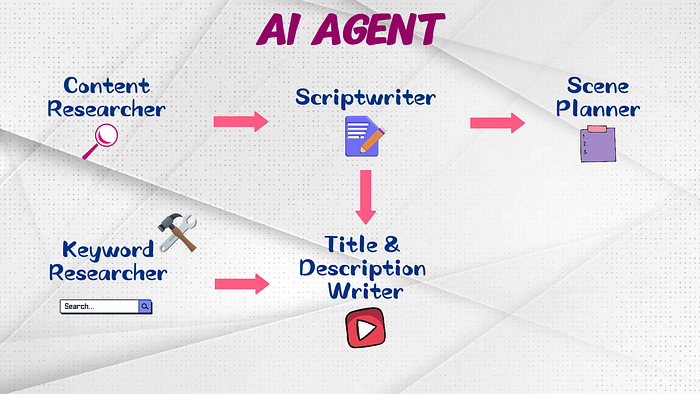
Article Outline
- Element #4: Keyword Research
- Element #5: Title and Description
Element #4: Keyword Research
Next up, we introduce the keyword_researcher_agent() in agents.py. The role is, of course, Video Keyword Researcher, and the goal is to conduct a YouTube keyword search on the desired topic using a tool that we’ll define later. This agent will use the YouTube Data API to gather details about the top ranking videos in a YouTube search for the specified topic keyword.
For the backstory, we define the agent to be an expert in keyword research, and instruct the agent to use the custom tool we’ll provide to identify the top 20 ranking YouTube videos on the desired keyword topic search. We also specify that this extracted information will be used by another agent in the AI system.
Put the llm argument, set verbosity to true for printouts, allow_delegation to false since we don’t need to delegate tasks to other agents. Set max_iteration to 5, and provide the custom tools to do keyword search on YouTube.
def keyword_researcher_agent(self):
    return Agent(
        role="Video Keyword Researcher",
        goal=(
            f"You should do a YouTube keyword search using the provided tool on the keyword topic: {self.topic}, "
            f"for 20 videos on this topic keyword that rank the highest in YouTube video search. "
            f"The collected information will be used to create the title and description for a new YouTube video."
        ),
        backstory=(
            f"You are an expert in keyword research and gathering information about YouTube videos. "
            f"You utilise the provided tool to identify the top 20 ranking YouTube videos on topic: {self.topic}, "
            f"and extract their information as a reference for another agent."
        ),
        llm=self.agent_llm,
        verbose=True,
        allow_delegation=False,
        max_iter=5,
        tools=[YoutubeKeywordSearchTool()]
    )
Now let’s create the custom tool called YoutubeKeywordSearchTool() in tools.py.
Create Custom Tool
Based on the CrewAI documentation, the format we need is pretty clear. We need to define our tool as a class with name, description, and a function _run().
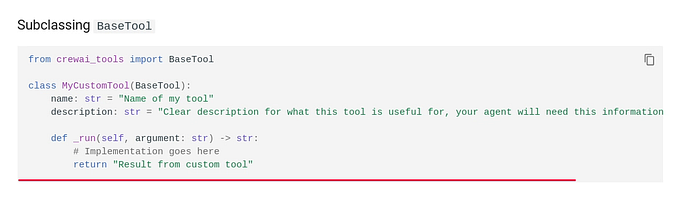
Define the class YoutubeKeywordSearchTool in tools.py. Name the tool, give it a clear title that conveys its purpose. Make sure the description is written in a way that the agent can easily understand how and when to use this tool, and we explain the arguments for _run(). The argument query refers to the keyword we’ll be searching for using the YouTube Data API, which is the topic we give to our agents. The argument max_results is the number of video results we’d like the API to return.
class YoutubeKeywordSearchTool(BaseTool):
    name: str = "Keyword Search on YouTube"
    description: str = (
        "Search for videos on YouTube using the YouTube Data API to return a list of a specific number of videos, "
        "based on the provided keyword query. The argument 'query' takes the provided keyword as an input, "
        "and the argument 'max_result' takes the number of video results to return as an input."
    )

    def _run():
      ...
Before we create the _run() function, let’s go to the YouTube Data API documentation to learn how to use this API. Since we are doing a keyword search, navigate to search >> list, look at list by keyword >> </> to open up the API explorer.
The document example uses max_results 25, query q is ‘surfing’. Untick OAuth since we don’t need it for keyword search. Execute, go to the Python tab, and look at the code to build the API connection, create the API request, and execute.
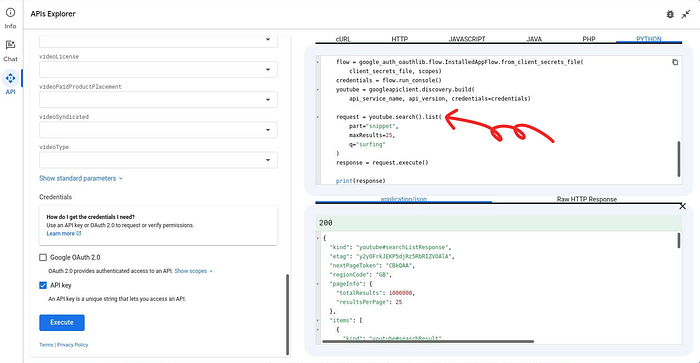
Let’s get back to tools.py and create the _run() function.
- Create connection to the API client by providing the YouTube API key.
- Create the search request by following the example code in the API documentation.
- Execute the request and get the desired items from the search response.
- Extract details such as the rank and video title.
- Also, get the video ID to make another API call for statistics related to each video.
- Append the video search result into a list of lists before putting it into a Pandas dataframe.
def _run(self, query: str, max_results: int = 20) -> str:
    youtube = build(serviceName='youtube', version='v3', developerKey=os.getenv("YOUTUBE_API_KEY"))
    search_request = youtube.search().list(
        part="snippet",
        maxResults=max_results,
        q=query,
        type="video"
    )
    search_response = search_request.execute()
    search_items = search_response.get("items", [])

    result_list = [["rank", "video_id", "video_title"]]
    for idx, item in enumerate(search_items):
        result_list.append([
            idx + 1,
            item['id']['videoId'],
            item['snippet']['title']
        ])

    result_df = pd.DataFrame(result_list[1:], columns=result_list[0])

...- Make another API call to get information such as the number of comments, likes, and views for each video.
- Create the search request, execute it, and get the desired items from the search response.
- Extract the details on the number of comments, likes, and views for each video and put it into a Pandas dataframe.
- Merge the two pandas dataframes together and convert the merged dataframe into a CSV format, making it easy for the agent to read and process.
def _run(self, query: str, max_results: int = 20) -> str:

    ...

    result_df = pd.DataFrame(result_list[1:], columns=result_list[0])

    vid_request = youtube.videos().list(
        part="snippet,statistics",
        id=','.join(map(str, list(result_df['video_id'])))
    )
    vid_response = vid_request.execute()
    vid_items = vid_response.get("items", [])

    vid_list = [["video_id", "comment_count", "like_count", "view_count"]]
    for item in vid_items:
        vid_list.append([
            item['id'],
            int(item['statistics']['commentCount']),
            int(item['statistics']['likeCount']),
            int(item['statistics']['viewCount'])
        ])

    vid_df = pd.DataFrame(vid_list[1:], columns=vid_list[0])
    # merge both df
    full_result_df = pd.merge(result_df, vid_df, on='video_id')
    full_result_csv = full_result_df.to_csv(index=False)
    return full_result_csv
Great! We’ve done all the heavy lifting in creating our custom tool.
Create Task
Let’s get back to tasks.py to create keyword_researcher_task(). We write a description that clearly mention the arguments, like 20 max results on the topic keyword, in which the agent should use to run the tool we’ve created.
As usual, expected_output will have a template for the agent to follow. The output from this task should be formatted as a CSV file with the following columns:
rank, for the video ranking of the Youtube search resultvideo_id, the uniquely identified id of each Youtube videovideo_title, which is the title of each Youtube videocomment_count, that shows the number of comments for each videolike_count, showing the number of likes that each video obtainedview_count, which is the number of views the video has acquired since published
Give it some examples on the rows of the top ranking videos CSV file.
We need an argument for the agent associated with this task, which will be specified later in main.py. The context will also be specified later in main.py. We save the top ranking videos in an output_file at the desired path.
def keyword_researcher_task(self, agent, context):
    return Task(
        description=(
            f"You should do a YouTube keyword search using the provided tool on the keyword: {self.topic}, "
            f"for 20 videos on this topic keyword that rank the highest in YouTube video search."
        ),
        expected_output=(
            "You should output a CSV file with the following columns, from left to right:"
            "- rank: [the 'rank' column, eg: 1,2,3,...]\n"
            "- video_id: [the 'video_id' column from the tool output]\n"
            "- video_title: [the 'video_title' column from the tool output]\n"
            "- comment_count: [the 'comment_count' column from the tool output]\n"
            "- like_count: [the 'like_count' column from the tool output]\n"
            "- view_count: [the 'view_count' column from the tool output]\n"
            "Your output file should follow the template provided below inside the triple backticks delimiter. "
            "Do not include any extra words and symbols other than those required as in the template. "
            "You should STRICTLY follow the template format INSIDE the triple backticks delimiter. "
            "Do not include any extra words or symbols other than those required to fill up the template format.\n"
            "```\n"
            f'''"The top 20 ranking YouTube videos for topic: {self.topic}"\n'''
            '''"rank","video_id","video_title","comment_count","like_count","view_count"\n'''
            '''"1","Ks-_Mh1QhMc","Your body language may shape who you are | Amy Cuddy | TED","9853","443945","25186508"\n'''
            '''...\n'''
            "```"
        ),
        agent=agent,
        context=context,
        output_file=os.path.join(self.output_dir, 'top_rank_videos.csv')
    )
Now, you might be wondering:
Why are we still explicitly showing how the CSV columns should look like in
expected_output, even though our custom tool is already generating the desired format?
Here’s why: if you don’t articulate the CSV format explicitly in the expected output, the agent may go into a lengthy loop of repetitions, in attempt to arrive at the expected output, since it might be thinking that the output state isn’t achieved yet.
When this happens, it triggers repeated thoughts, actions, and observations, which quickly takes up your budget with unnecessary LLM calls. So it’s better to be clear upfront to avoid this. We’ll explain more about the thought, action, and observation process in the next article when we analyze the CrewAI run.
Element #5: Title and Description
Let’s introduce the final piece of our puzzle! This is where we create the title_description_writer_agent() to generate engaging titles and descriptions for our new video.
Put ‘Video Title and Description Writer’ as the role, and the goal is to create titles and descriptions for a new YouTube video on the desired topic.
For the backstory, we define the agent to be an expert in creating video titles and descriptions. We let the agent know that it should generate titles and descriptions based on two important pieces of information:
- video script provided by
scriptwriter_agent() - high-ranking video details gathered by
keyword_researcher_agent()
Why is this important? Because we want our new video to rank high in YouTube searches. We also want the title and description to be able to attract high click-through rate. We have the llm argument here, and we’ll specify the LLM to the agent later in main.py. Set verbosity to true for printouts, allow_delegation to false since we don’t need to delegate tasks to other agents, and set max_iteration to 5.
def title_description_writer_agent(self):
    return Agent(
        role="Video Title and Description Writer",
        goal=f"Create titles and descriptions for a new YouTube video on the topic: {self.topic}.",
        backstory=(
            f"You are an expert in creating title and description for new YouTube videos. "
            f"You base your title and description writing on the video script provided by Video Scriptwriter, and "
            f"the research output from Video Details Researcher. Based on these two elements, "
            f"you create attractive titles and descriptions for the new YouTube video that makes the video "
            f"rank high in the YouTube search. You produce a video title and description that attract "
            f"audience with high click-through rate. "
        ),
        llm=self.agent_llm,
        verbose=True,
        allow_delegation=False,
        max_iter=5,
    )
Create Task
Now let’s move to tasks.py to create title_description_writer_task() . In the description, we provide a task flow that the agent should follow when generating video titles and descriptions. First, we emphasize on using the video script and keyword search result, to generate 5 catchy titles and descriptions for our new video on the desired topic. We specify the character limit of 100 for the video title, and character limit of 5000 for the video description. We ask the agent to generate titles and descriptions in a way that maximizes the potential for our video to rank high in keyword searches. We emphasize on using the video script provided by the scriptwriter agent, to ensure that the generated titles and descriptions are well tailored for our video.
We need an argument for the agent associated with this task, which will be specified later in main.py. The context will also be specified later in main.py. Save the generated titles and descriptions in to output_file at the desired path.
def title_description_writer_task(self, agent, context):
    return Task(
        description=(
            "You should follow the task flow below to generate good video titles and descriptions:\n"
            f"1. Based on the top 20 ranking YouTube video title and description by keyword researcher agent, "
            f"and the video script written by scriptwriter agent, generate 5 eye-catching titles "
            f"for the new YouTube video on topic: {self.topic}.\n"
            f"2. You should generate titles with less than 100 characters that have high click through rate.\n"
            f"3. For every video title you created, please generate a video description that will let the "
            f"new video rank high in a YouTube keyword search. The video description MUST be "
            f"less than 5000 characters.\n"
            f"4. You should generate new video titles and descriptions to ensure that the "
            f"video ranks at the top in a YouTube keyword search.\n"
            f"5. It is extremely IMPORTANT to use the video script written by scriptwriter agent, "
            f"to make sure that the titles and descriptions generated are well-tailored for the new video."
        ),
        expected_output=(...),
        agent=agent,
        context=context,
        output_file=os.path.join(self.output_dir, 'title_description.txt')
    )
For the expected_output, we give a clear template that the agent should follow within the triple back ticks when generating its response for the titles and descriptions. Ask the agent to strictly follow the template, and no extra stuff should be generated. Give it some example lines on how the output should look like.
def title_description_writer_task(self, agent, context):
    return Task(
        description=(...),
        expected_output=(
            "Your output file should follow the template provided below inside the triple backticks delimiter. "
            "Do not include any extra words and symbols other than those required as in the template. "
            "You should STRICTLY follow the template format INSIDE the triple backticks delimiter. "
            "Do not include any extra words or symbols other than those required to fill up the template format.\n"
            "```\n"
            f"Candidate titles and descriptions for topic: {self.topic}\n\n"
            "1. [Title generated #1]\n"
            "[Video description generated for title #1]\n\n"
            "2. [Title generated #2]\n"
            "[Video description generated for title #2]\n\n"
            "3. [Title generated #3]\n"
            "[Video description generated for title #3]\n\n"
            "4. ...\n"
            "```"
        ),
        ...
    )
Phew, almost done. In the next (final!) article, we'll put everything together in main.py , then run and analyze the AI system.
Frequently asked questions
How should I check the custom tool before involving an agent?
Call it directly with a known query and inspect the returned rows. Keep a saved response you can reuse while working on the agent instructions. This separates problems in data collection from problems in how the model interprets or presents the result.
What should the workflow do when the search returns no useful results?
Represent that outcome explicitly and decide whether to try a different query or ask for a human decision. Do not treat an empty result as evidence that the topic has no audience. Keeping an empty result distinct from an API failure makes the next step easier to choose.
Can the title writer copy the strongest title from the search results?
Use the results to examine how other videos frame the topic, then check each candidate against your own script. A compelling title still needs to describe the video you can deliver. Reject candidates that borrow a promise, result or claim your material does not support.
What information should I retain when comparing keyword research runs?
Keep the query, retrieval time and returned video identifiers alongside the generated candidates. That lets you distinguish a change in the source material from a change in the prompt. Without the retrieved input, a later comparison can attribute different titles to the wrong cause.