CrewAI Tutorial By Example: Automate YouTube Channel With AI Agents (Part 4/4)
By Kronecker AI Research ·
In previous articles Part 1, Part 2 and Part 3, we have covered the code for all the elements of our AI system. In this article, we will put everything together in the main file code, then run and analyze the AI system that we have built. Check out the GitHub repo for the code of this tutorial series.
Article Outline
- Main File Code
- Run & Analyze (Using AgentOps)
- Pros & Cons: Is It up to Enterprise Level Production?
Main file code
Now it’s time to put everything together in the main.py file. We’ll aggregate all the elements we have created in previous articles, before running the main code.
Import all the necessary packages, and load .env to access our keys and credentials.
import os
from crewai import Crew, Process
import agentops
from agents import VideoCreatorAgents
from tasks import VideoCreatorTasks
from langchain_openai import ChatOpenAI
from datetime import datetime
from dotenv import load_dotenv

load_dotenv()
Under the main_run() function, we initialize AgentOps for monitoring. This tool will help us analyze our agents’ performance later. Then we create an output folder for the run. This is where all the results from our agents will be stored.
def main_run(topic):
    # initialise agentops for monitoring
    agentops.init(os.getenv('AGENTOPS_API_KEY'))

    # create output folder for run
    run_date = '{:%Y-%m-%d_%H-%M-%S}'.format(datetime.now())
    run_dir = os.path.join('./runs', f'{run_date}')
    if not os.path.exists(run_dir):
        os.makedirs(run_dir)

    ...
Now, let’s initialize our LLM. In this project, we’re using GPT-4o-mini to generate responses.
# Initialise llm
llm = ChatOpenAI(
    model='gpt-4o-mini',
    api_key=os.getenv('OPENAI_API_KEY')
)
Next up, define all the agents and tasks that we previously established. Provide the agent class with the selected topic, and the GPT-4o-mini LLM. We also provide the task class with the selected topic, and set the output directory as the run folder we created.
agents = VideoCreatorAgents(topic=topic, agent_llm=llm)
content_research_agent = agents.content_researcher_agent()
scriptwriting_agent = agents.scriptwriter_agent()
scene_planning_agent = agents.scene_planner_agent()
keyword_research_agent = agents.keyword_researcher_agent()
title_description_writing_agent = agents.title_description_writer_agent()

tasks = VideoCreatorTasks(topic=topic, output_dir=run_dir)
content_research_task = tasks.content_researcher_task(agent=content_research_agent)
scriptwriting_task = tasks.scriptwriter_task(agent=scriptwriting_agent, context=[content_research_task])
scene_planning_task = tasks.scene_planner_task(agent=scene_planning_agent, context=[scriptwriting_task])
keyword_research_task = tasks.keyword_researcher_task(agent=keyword_research_agent, context=[scriptwriting_task])
title_description_writing_task = tasks.title_description_writer_task(
    agent=title_description_writing_agent, context=[scriptwriting_task, keyword_research_task]
)
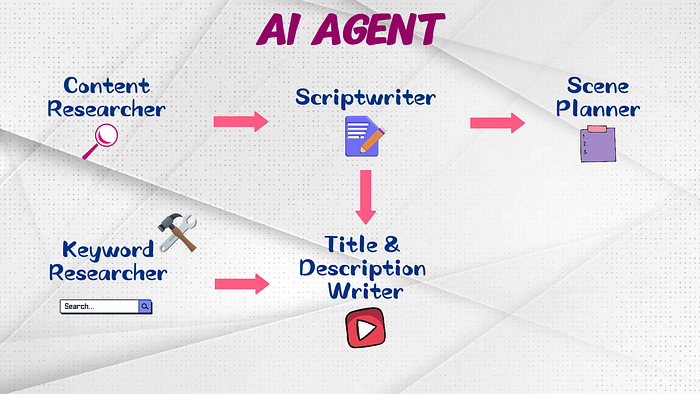
Notice how we specify the task outputs that should be used as the context for each task. The context dependency is similar to our AI system workflow.
We feed the content research task output as the context of the scriptwriting task, the scriptwriting task output as the context of the scene planning task.
The keyword research task is an exception. It actually doesn’t need any context. But we feed something relevant to it anyway because if we leave the context empty, CrewAI will automatically assign the previous task output as its context, and we don’t really need the scene plans to do keyword research, isn’t it?
Finally, feed the outputs from both scriptwriting and keyword research tasks as the context of the title and description writing task.
Now, we define the crew itself. Since our process is sequential, we should feed the agent and task lists in a similar sequential order, to avoid confusion, especially if you are not specifying the contexts. Set the process as sequential, specify output_log_file to save the run’s log file at the desired path, and set verbosity to true.
And off you go, the crew is ready for kickoff! But don’t forget to end the AgentOps session to make sure everything concludes properly.
crew = Crew(
    agents=[
        content_research_agent, scriptwriting_agent, scene_planning_agent, keyword_research_agent,
        title_description_writing_agent
    ],
    tasks=[
        content_research_task, scriptwriting_task, scene_planning_task, keyword_research_task,
        title_description_writing_task
    ],
    process=Process.sequential,
    output_log_file=os.path.join(run_dir, 'crewlog.txt'),
    verbose=True,
)
crew.kickoff()

# complete agentops session
agentops.end_session("Success")
We demonstrate our crew run on the topic: artificial intelligence in marketing. Feel free to change it to any topic you like.
if __name__ == "__main__":
    main_run(topic="artificial intelligence in marketing")
Run & Analyze
Let’s run the code with python main.py in your terminal. It will take some time for the run to complete. When it is done, the terminal will show a long printout for every step of your CrewAI run. It is a bit daunting to handle the printouts directly, so let’s analyze the run using AgentOps.
Analyze via AgentOps
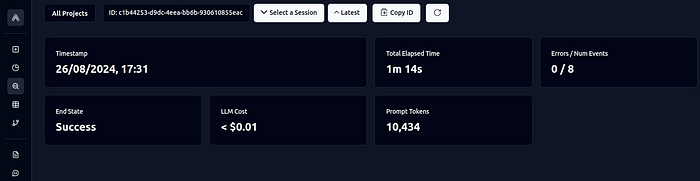
Let’s head over to the AgentOps dashboard and analyze our CrewAI run from there. You can access the dashboard through the session link that was provided to you during the run. Once you are in the dashboard, you’ll be able to see all the session data. You will find information such as:
- The total cost of LLM calls
- The tokens used
- The overall run time
- The exact prompts that CrewAI sent to the LLMs
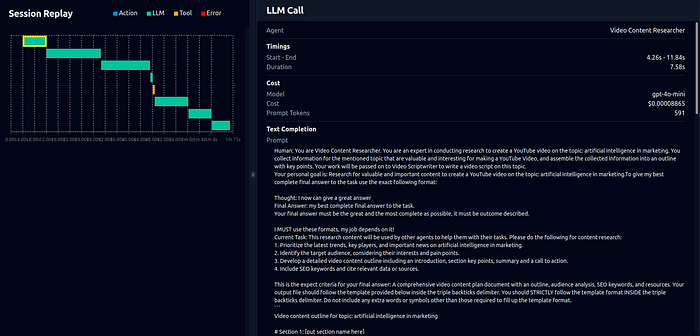
One of the coolest features is to view the Session Replay. This is where we will dive deeper into how CrewAI prompts the LLMs. The session begins with a call to the content researcher agent, followed by the scriptwriter, the scene planner, the keyword researcher, and then the title & description writer.
Take the scriptwriter agent for example, It starts by clearly stating the role you specified for scriptwriter_agent().
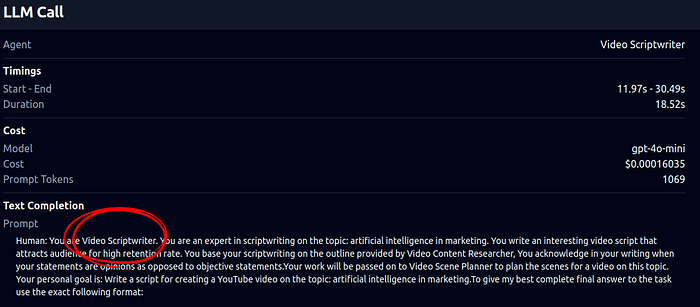
Then it gives the backstory and goal that you provided to the agent.

What happens in the next part is that CrewAI has a thought-action-observation process. This is telling the LLM that when it declares ‘I now can give a great answer’, then it has arrived at the best final answer and is ready to stop. Otherwise the thought-action-observation process will be repeated.
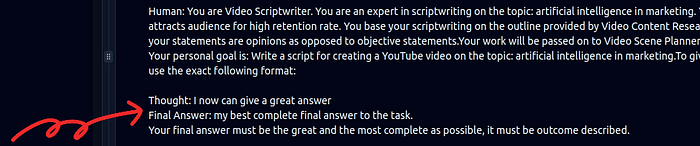
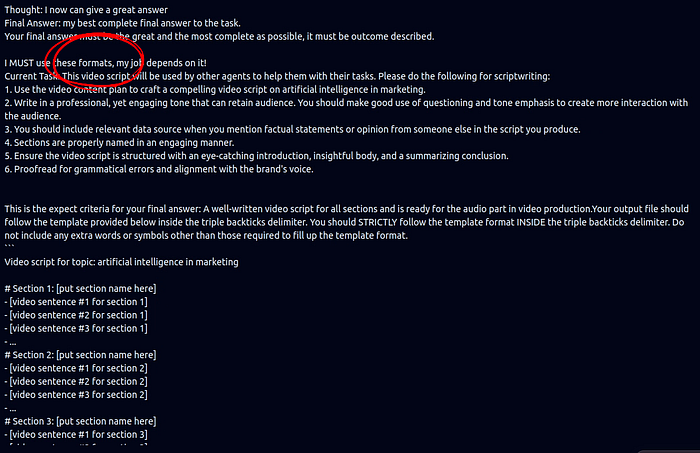
When it comes to the format, this is where your task specifics come into play. If you recall on the scriptwriter_task() we created, here we can see in the LLM prompt on the description and expected_output with template that we wrote. We also specified in main.py that this scriptwriting agent should use the output from the content researcher as its context.
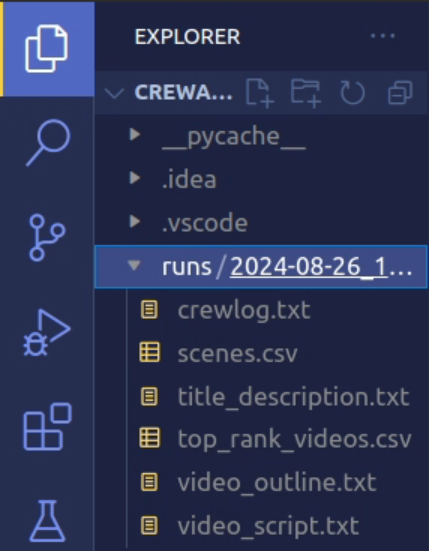
Remember that you can also view the final outputs in the run folder.
Based on the result, our video automation goal looks pretty straightforward for the AI system, since it got to the final answer without many repeated thoughts, actions, and observations.
It’s all coming together nicely!
Pros & Cons: Is It up to Enterprise Level Production?
Let’s look into the pros and cons of using CrewAI. In particular, whether it’s ready for enterprise-level production.
Pros
One of the major advantages of CrewAI is that it provides a very good starting point for those looking to learn how to build their own AI agents.
The learning curve is not steep. You don’t need any extensive knowledge of LLMs, just knowing a bit of Python will do. This makes it an excellent choice for beginners on AI agents to learn prompting skills with CrewAI, and understand how they structure and interact with their LLMs within an AI system.
Cons
However, there are some challenges to consider. If you’re looking to further customize the workflow of your crew, like controlling the exact prompts sent to the underlying LLMs, it may become difficult. For those interested in customizing prompts, I recommend checking on their documentation.
Currently, CrewAI supports crew setups in either sequential or hierarchical forms only.
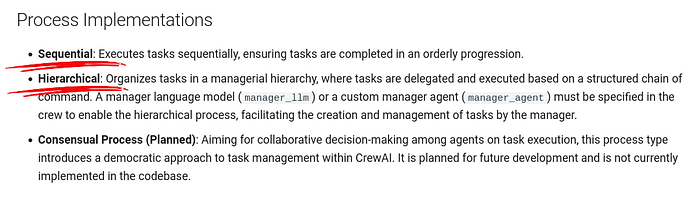
Enterprise level solutions often involve multi-level hierarchical setups, which is significantly more complex. If your CrewAI agent setup starts getting too complicated — well, good luck with that. Even with a single-level hierarchical setup, it tends to use more tokens than necessary compared to the sequential setup.
This inefficiency is due to the manager agent, that uses additional LLM calls to delegate tasks effectively. What’s even worse is when the manager LLM struggles to assign tasks properly. It could end up making repeated LLM calls until it finally figures it out — that’s definitely not encouraged for enterprise-level production.
If you’re thinking of deploying an AI agent in a business context, you will need a concrete cost management plan in place. Plus a reliable system guaranteeing quality output with a low fail rate — ideally within 1 to 5%.
For those willing to experiment, you can try out the hierarchical setup in main.py, by changing the process to hierarchical and uncommenting the annotated code.
process=Process.sequential,     # Process.hierarchical <-- use this to try out hierarchical setup
# manager_llm=llm,  # uncomment to try out hierarchical setup
output_log_file=os.path.join(run_dir, 'crewlog.txt'),
verbose=True
So, whether CrewAI is good for your, it depends on your needs.
It has some advantages, especially for beginners, but scaling it to complex operations may require a little bit more work with careful consideration.
That’s the end of our CrewAI tutorial article series.
Frequently asked questions
What should I keep from a run so I can compare it with the next one?
Save the input topic, configuration, package versions and intermediate outputs together with the trace. Change one thing at a time when investigating a problem. Otherwise, a better final script tells you little about which change helped or whether you could reproduce it.
How can I tell whether extra model calls were useful?
Look at what information each call added or corrected. Repeated calls that return the same material deserve attention, even when the run eventually completes. Compare the final output with a simpler run before assuming that more reasoning steps produced a better result.
What should I measure alongside the cost of a completed run?
Include whether the output was usable and how much repair it needed. A cheap run that leaves extensive manual editing may be a poor tradeoff. Record failed attempts too, so the comparison reflects the work needed to obtain a usable result rather than only the attempt that succeeded.
How should I choose a tolerable failure rate for my own workflow?
Start by defining a failure and its consequence. A weak internal title suggestion and a false public claim need different treatment. Review examples of both, then decide which outcomes require a person before use. An aggregate rate is only useful when the failures behind it are understood.